Setting a Custom Window Title for GNOME Terminal
Setting a Custom Window Title for GNOME Terminal (Perfect for Menu Shortcuts)
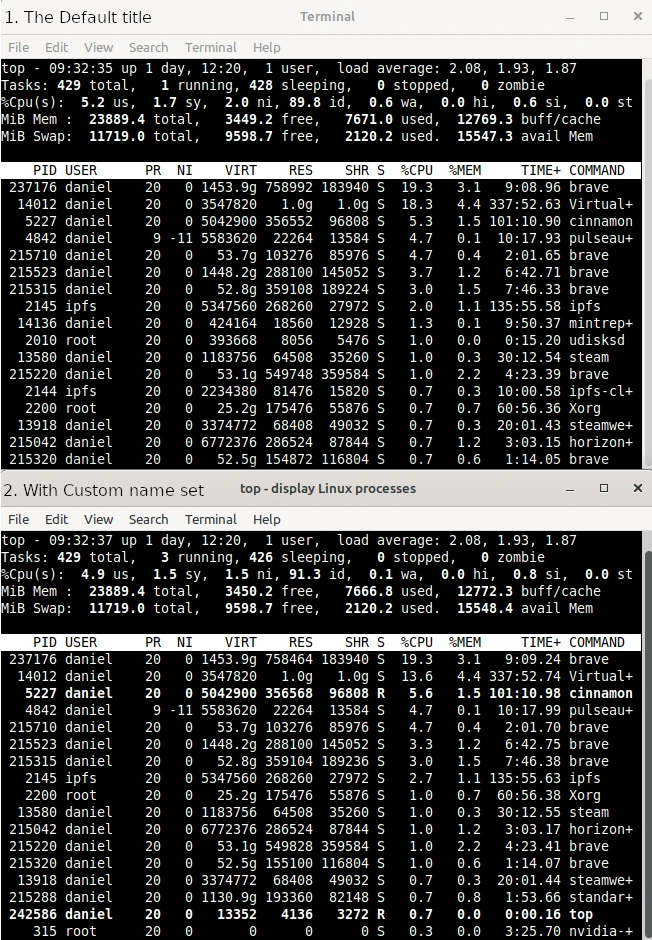
If you’ve ever created a Cinnamon menu item or desktop shortcut that launches a terminal command, you’ve probably run into an annoying problem: the window just opens up labeled “Terminal”. That’s fine when you’re typing commands interactively, but it’s useless when you’ve got five different terminal shortcuts pinned to your menu and can’t tell them apart in the taskbar or Alt-Tab switcher.
The good news is that GNOME Terminal gives you a few different ways to set a custom title, and they work great for exactly this use case.
The --title flag
The quickest fix is to pass the --title option directly to gnome-terminal when you launch it:
gnome-terminal --title="top - display Linux processes" -- bash -c "top; exec bash"
Breaking that down:
--title="System Update"sets the window title.-- bash -c "..."runs your actual command inside a new bash shell.exec bashat the end keeps the terminal window open after the command finishes, so you can see the output instead of the window disappearing instantly.
This is the ideal approach for a .desktop file or a Cinnamon menu item, because it’s a single, self-contained command — no scripts required.
Making it a Cinnamon menu item
If you’re building a custom .desktop file for the Cinnamon menu (usually placed in ~/.local/share/applications/), the Exec line is where this all comes together:
[Desktop Entry]
Name=process viewer - top
Comment=Run top - display Linux processes
Exec=gnome-terminal --title="top - press Q to quit" -- bash -c "top;"
Icon=utilities-terminal
Terminal=false
Type=Application
Categories=System;
Note Terminal=false — that’s intentional. You’re already telling gnome-terminal to open a window yourself in the Exec line, so you don’t want Cinnamon launching another terminal wrapper around it.
Why the title matters more than it seems
It’s a small detail, but once you’ve got a handful of terminal-based shortcuts — a backup script, a log tailer, a dev server, a system update — having each one clearly labeled in the window list saves you from that “wait, which terminal was I already running?” moment. A few extra characters in your Exec line is a cheap trade for not losing track of what’s running where.
Quick reference
| Goal | Command |
|---|---|
| Set title at launch | gnome-terminal --title="Name" -- your-command |
| Keep window open after command finishes | append ; exec bash |